

异步任务
在Java应用中,绝大多数情况下都是通过同步的方式来实现交互处理的;但是在处理与第三方系统交互的时候,容易造成响应迟缓的情况,之前大部分都是使用多线程来完成此类任务,其实,在Spring 3.x之后,就已经内置了@Async来完美解决这个问题。
两个注解:
@EnableAysnc、@Aysnc
@SpringBootApplication
@EnableAsync//开启异步注解功能
public class Springboot04TaskApplication {

    public static void main(String[] args) {
        SpringApplication.run(Springboot04TaskApplication.class, args);
    }

}
@Service
public class AsyncService {
    //告诉spring这是一个异步方法
    @Async
    public void hello() {
        try {
            Thread.sleep(3000);
        } catch (InterruptedException e) {
            e.printStackTrace();
        }
        System.out.println("处理数据中···");
    }
}
@RestController
public class AsyncController {

    @Autowired
    AsyncService asyncService;

    @GetMapping("/hello")
    public String hello() {
        asyncService.hello();
        return "success";
    }
}
会发现在前端调用/hello请求的时候会立即执行,同时三秒后service方法在控制台打印
定时任务
项目开发中经常需要执行一些定时任务,比如需要在每天凌晨时候,分析一次前一天的日志信息。Spring为我们提供了异步执行任务调度的方式,提供TaskExecutor 、TaskScheduler接口。
两个注解:@EnableScheduling、@Scheduled
cron表达式:
| 字段 | 允许值 | 允许的特殊字符 |
|---|---|---|
| 秒 | 0-59 | , - * / |
| 分 | 0-59 | , - * / |
| 小时 | 0-23 | , - * / |
| 日期 | 1-31 | , - * ? / L W C |
| 月份 | 1-12 | , - * / |
| 星期 | 0-7或SUN-SAT 0,7是SUN | , - * ? / L C # |
| 特殊字符 | 代表含义 |
|---|---|
| , | 枚举 |
| - | 区间 |
| * | 任意 |
| / | 步长 |
| ? | 日/星期冲突匹配 |
| L | 最后 |
| W | 工作日 |
| C | 和calendar联系后计算过的值 |
| # | 星期,4#2,第2个星期四 |
@SpringBootApplication
@EnableAsync//开启异步注解功能
@EnableScheduling//开启给予注解的定时任务
@Service
public class ScheduledService {
    /**
     * second(秒), minute(分), hour(时), day of month(日), month(月), day of week(周几).
     * 0 * * * * MON-FRI
     * 周一到周五,无论哪月,哪日,哪时,哪分,整秒启动
     */
    /*@Scheduled(cron = "0 * * * * MON-FRI")*/
    /*@Scheduled(cron = "0,1,2,3,4 * * * * MON-FRI")*/
    @Scheduled(cron = "0/4 * * * * MON-FRI")
    public void hello() {
        System.out.println("hello....");
    }
}
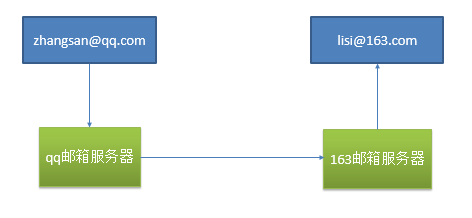
邮件任务
- 邮件发送需要引入
spring-boot-starter-mail - Spring Boot 自动配置
MailSenderAutoConfiguration - 定义
MailProperties内容,配置在application.yml中 - 自动装配
JavaMailSender - 测试邮件发送
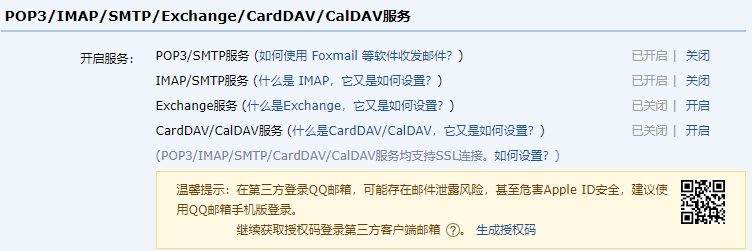
spring.mail.username=1159011520@qq.com
spring.mail.password=tugkyugdegclgefc
spring.mail.host=smtp.qq.com
spring.mail.properties.mail.smtp.ssl.enable=true
@RunWith(SpringRunner.class)
@SpringBootTest
public class Springboot04TaskApplicationTests {

    @Autowired
    JavaMailSenderImpl javaMailSender;
    //发送简单邮件
    @Test
    public void contextLoads() {
        SimpleMailMessage simpleMailMessage = new SimpleMailMessage();
        //邮件设置
        simpleMailMessage.setSubject("老婆找你");
        simpleMailMessage.setText("今晚必须回家");
        simpleMailMessage.setTo("18821713427@163.com");
        simpleMailMessage.setFrom("1159011520@qq.com");

        javaMailSender.send(simpleMailMessage);
    }
    //发送复杂邮件带附件
    @Test
    public void test() throws MessagingException {
        //创建一个复杂的消息邮件
        MimeMessage mimeMessage = javaMailSender.createMimeMessage();
        MimeMessageHelper helper = new MimeMessageHelper(mimeMessage, true);
        //邮件设置
        helper.setSubject("女神来信");
        helper.setText("今晚一起吃饭好吗");
        helper.setTo("18821713427@163.com");
        helper.setFrom("1159011520@qq.com");
        //上传文件
        helper.addAttachment("1.jpg", new File("E:\\Pictures\\1.jpg"));
        helper.addAttachment("2.jpg", new File("E:\\Pictures\\2.jpg"));
        javaMailSender.send(mimeMessage);

    }

}
