js
https的链接里请求 http的东西有报错
<meta http-equiv="Content-Security-Policy" content="upgrade-insecure-requests">
解决键盘弹出后挡表单的问题
window.addEventListener('resize', function () {
if (
  document.activeElement.tagName === 'INPUT' ||
  document.activeElement.tagName === 'TEXTAREA' ||
  document.activeElement.getAttribute('contenteditable') == 'true'
    ) {
  window.setTimeout(function () {
    if ('scrollIntoView' in document.activeElement) {
  document.activeElement.scrollIntoView();
   } else {
  // @ts-ignore
  document.activeElement.scrollIntoViewIfNeeded();
    }
  }, 0);
}
})
js模拟长按功能
$(".btn").on({
    mousedown: function () {
        var timeexe = setTimeout(function () {
            alert(1);

        }, 2000);

        $(this).data("time", timeexe);

    },
    mouseup: function () {
        var timeexe = $(this).data("time");
        window.clearInterval(timeexe);
    },
    touchstart: function () {
        $(this).trigger("mousedown");
    },
    touchend: function () {
        $(this).trigger("mouseup");
    }
});
css
li与li之间有看不见的空白间隔是什么原因引起的?有什么解决办法?
行框的排列会受到中间空白(回车\空格)等的影响,因为空格也属于字符,这些空白也会被应用样式,占据空间,所以会有间隔,把字符大小设为0,就没有空格了。
vue
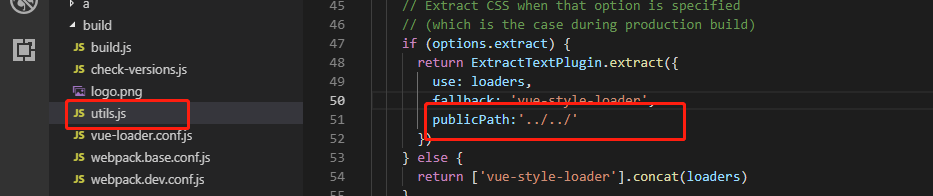
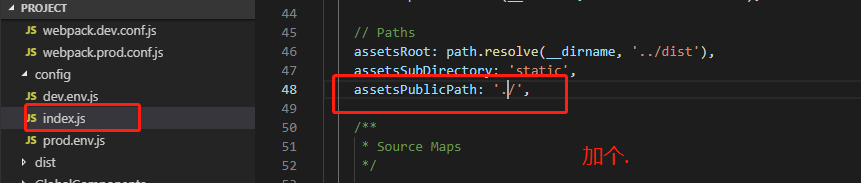
vue 打包后 element 的图标不显示
测试环境与线上环境域名不一致
- main.js中配置
if (process.env.NODE_ENV !== 'development') {
   Vue.prototype.URL_PREFIX = '线上环境'
 } else {
   Vue.prototype.URL_PREFIX = '测试环境'
}
- 封装的axios中 要访问的路径使用 this.URL_PREFIX
import {
           delCookie,
           getCookie,
           setCookie
       } from '@/api/cookie/index.js'
       import axios from 'axios';

       import { Message } from 'element-ui';

       export default function fetch(options) {
           return new Promise((resolve, reject) => {
               //创建一个axios实例
               let base = {
                   server: this.URL_PREFIX,
               }
               let headerCont = {
                   text: 'application/x-www-form-urlencoded; charset=UTF-8',
                   //			json: 'application/json',
               }
               const instance = axios.create({
                   //设置默认根地址
                   baseURL: base[options.base],
                   //设置请求超时设置
                   //			timeout: 20000,
                   //设置请求时的header
                   headers: {
                       'Content-Type': 'application/x-www-form-urlencoded; charset=UTF-8',
                       Authorization: getCookie('access_token'),
                       'X-Requested-With': 'XMLHttpRequest',
                   },
                   withCredentials: true,
               })

               let must = {}

               function extend(target, source) {
                   for (var obj in source) {
                       target[obj] = source[obj];
                   }
                   return target;
               }
               if (options.must && options.params || options.must && options.data) {
                   try {
                       options.params = extend(options.params, must)
                   } catch (e) {
                       options.data = Object.assign(options.data, must)
                   }
               } else {
                   options.params = must
               }
               instance.interceptors.response.use(
                   response => {
                       let data;
                       // IE9时response.data是undefined,因此需要使用response.request.responseText(Stringify后的字符串)
                       if (response.data == undefined) {
                           data = response.request.responseText
                       } else {
                           data = response.data
                       }
                       if (data.retcode == -10003) {
                           this.$message.error('登陆超时');
                           setTimeout(function () {
                               window.location = '/'
                           }, 1000)

                       } else {
                           return response
                       }

                   },
                   err => {
                       this.$message.error('系统错误,请稍后重试!');
                       // 此处我使用的是 element UI 的提示组件
                       // Message.error(`ERROR: ${err}`);
                       return Promise.reject('网络错误请重试') // 返回接口返回的错误信息
                   }
               )
               //请求处理
               instance(options).then((data) => {
                   //请求成功时,根据业务判断状态
                   resolve(data.data)
               })
                   .catch((error) => {
                       console.log(error);
                       //请求失败时,根据业务判断状态
                       if (error.response) {
                           let resError = error.response;
                           let resCode = resError.status;
                           let resMsg = error.message;
                           //					Message.error('操作失败!错误原因 ' + resMsg)
                           reject({
                               code: resCode,
                               msg: resMsg
                           })
                       }
                   })
           })
       }