

1.ES的基本概念
1.1 组成结构
在elasticsearch中,由索引,类型,文档构成。
- 索引 - 含有相同属性的文档集合 ,对应数据库中的database
- 类型 - 索引可以对应一个或多个类型,对应数据库中的table
- 文档 - 文档是可以被索引的基本数据单位,文档必须属于一个类型。
- 分片 - 每个索引都有多个分片,每个分片是一个Lucene索引(用于动态扩展)
- 备份 - 拷贝一份分片,就完成了该分片的备份(用于提高ES可用性)
ES默认启动时,创建5个分片,一个索引。
1.2 与RDBMS的对照理解
elasticsearch 可以理解为是一个分布式存储的文档型数据库。它与我们常用的关系型数据库如MYSQL等,可以进行一个类比。
- 索引 -- database
- 类型 -- table
- 文档 -- item
2. elastaicsearch的基本使用
2.1 elastaicsearch 的 API组成
API格式: http://<ip>:<port>/索引/类型/文档id
类型分为:GET/PUT/POST/DELETE
2.2 利用head插件创建索引
索引必须要小写,不能用中划线
2.2.1 非结构化创建
点击 索引 选项,点击新建索引
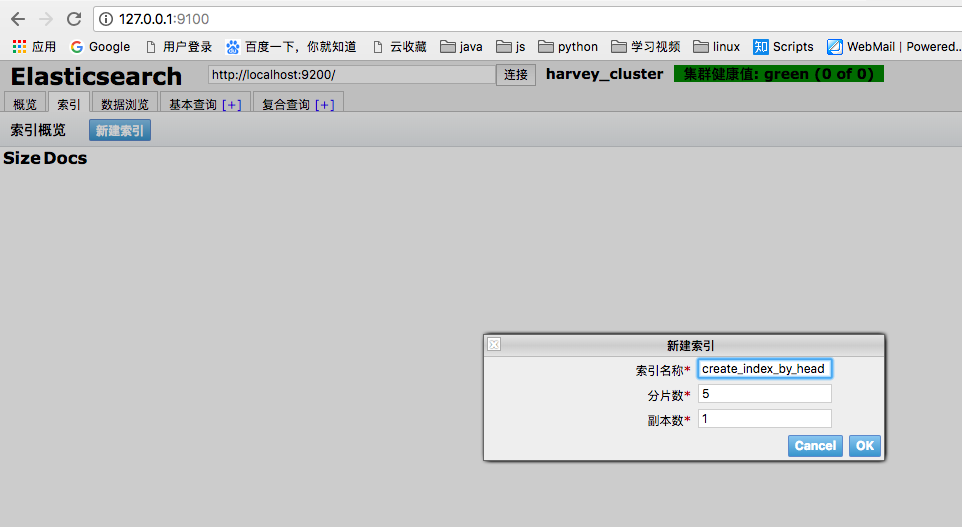
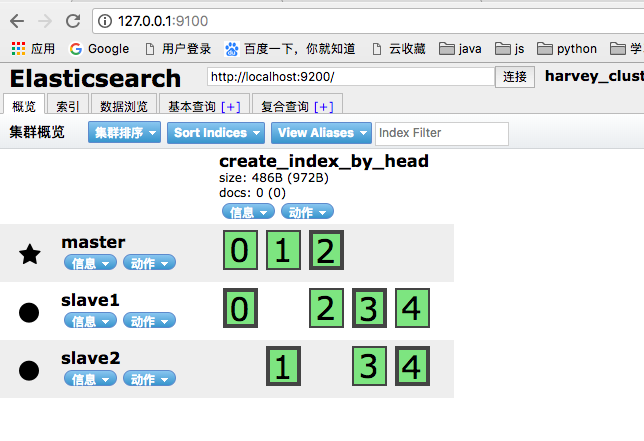
- create_index_by_head -- 表示创建的索引的名称
- 绿色加粗的框 -- 索引分片的数量,0-4代表有5个分片
- 绿色不加粗框 -- 代表一个分片的备份
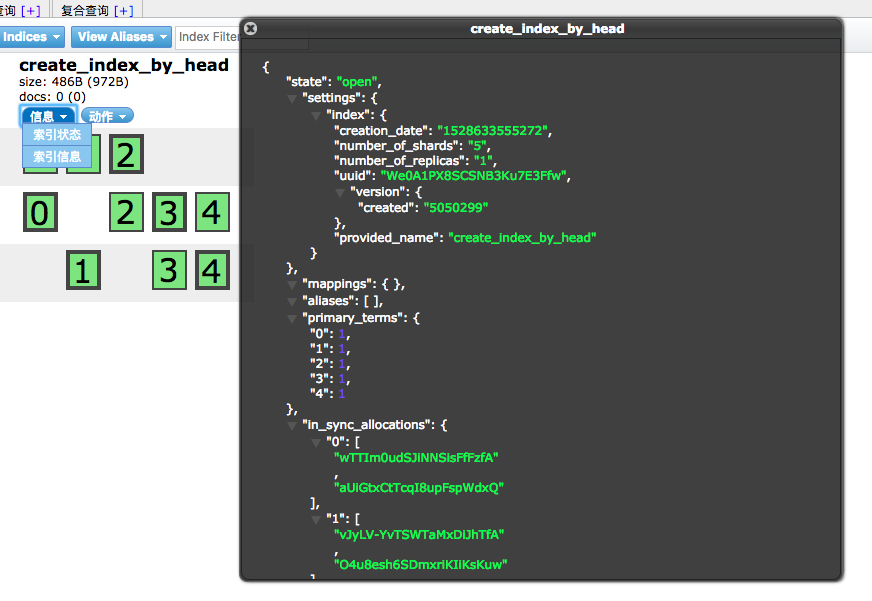
非结构化和结构化的区别在于mappings参数中有没有信息
2.2.2 结构化创建
1. 给非结构化创建的索引添加结构化
在复合查询中输入如下参数,点击提交
http://localhost:9200/
create_index_by_head/type_test/_mappings    POST请求
{
  "type_test": {
    "properties": {
      "title": {
        "type": "text"
      }
    }
  }
}
信息说明:
- create_index_by_head -- 索引名
- type_test -- 类型名
- title -- 类型中的某一个字段
上述代码的含义为: 为create_index_by_head索引添加结构化参数,指定一个类型为 type_test,对该类型下的属性中的title字段添加类型为text
2. 结构化创建
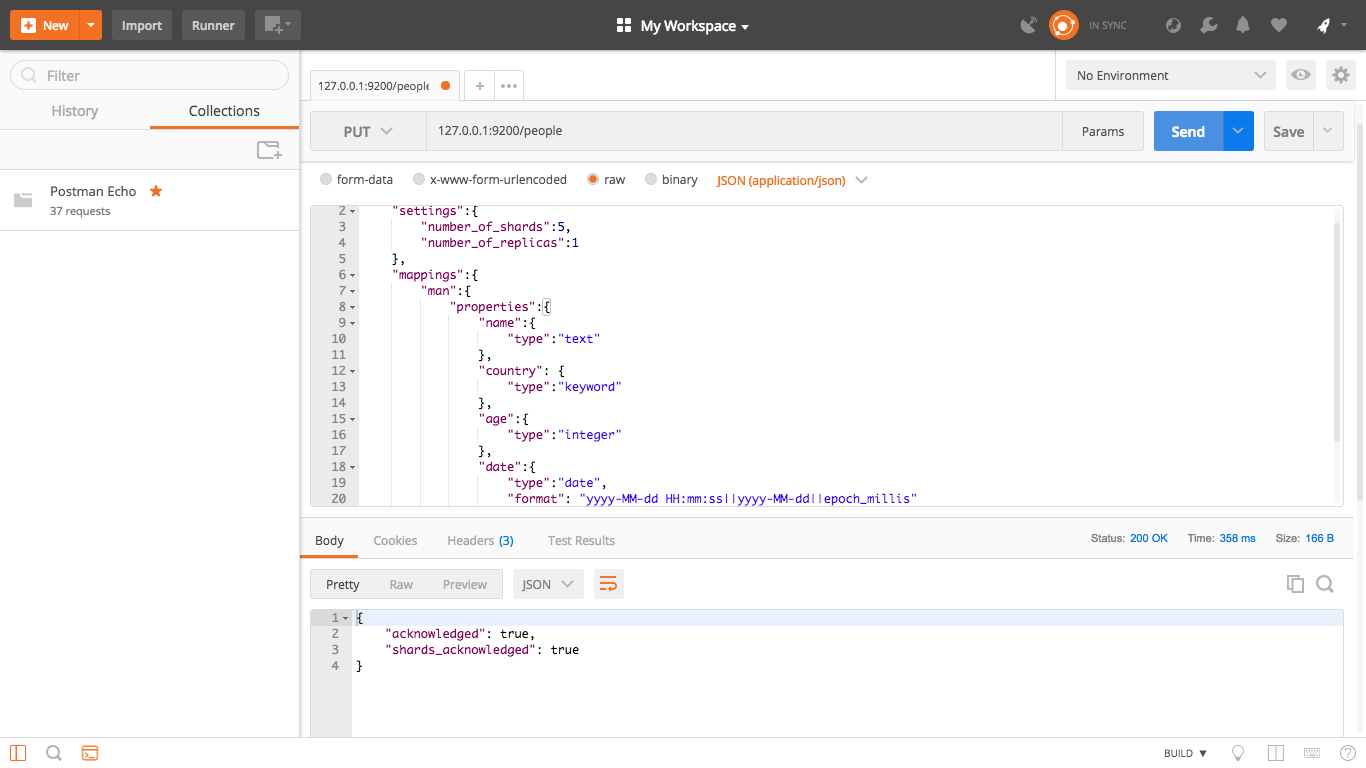
代码如下: 采用PUT请求,请求创建地址: 127.0.0.1:9200/people
{
	"settings":{
		"number_of_shards":5,
		"number_of_replicas":1
	},
	"mappings":{
		"man":{
			"properties":{
				"name":{
					"type":"text"
				},
				"country": {
					"type":"keyword"
				},
				"age":{
					"type":"integer"
				},
				"date":{
					"type":"date",
					"format": "yyyy-MM-dd HH:mm:ss||yyyy-MM-dd||epoch_millis"
				}
			}
		}
	}
}
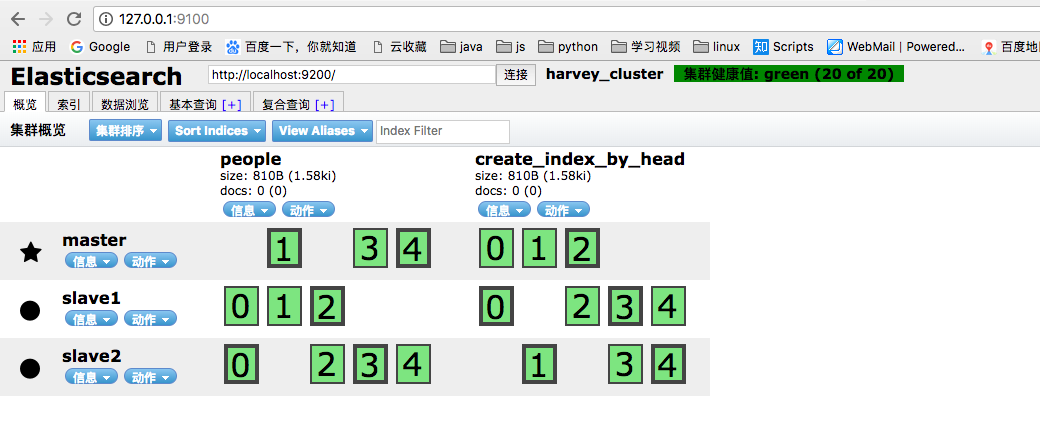
2.3 插入数据
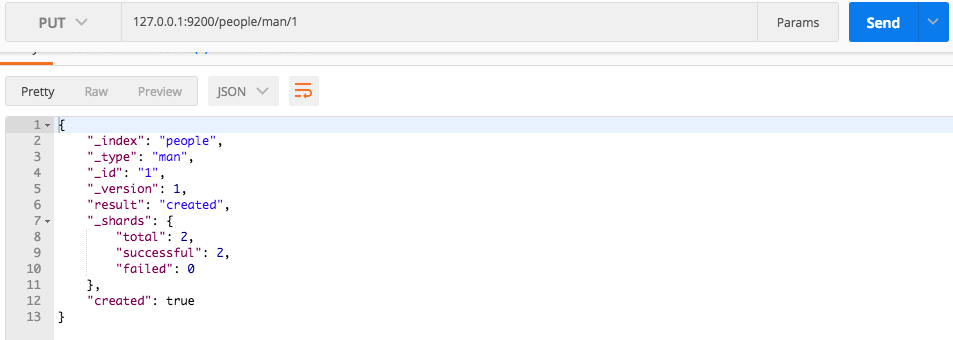
2.3.1 指定文档ID插入
利用postman工具, 输入
127.0.0.1:9200/people/man/1     PUT请求
{
	"name" : "harvey",
	"country" : "China",
	"age" : 24,
	"date": "2018-06-10 22:08:08"
}
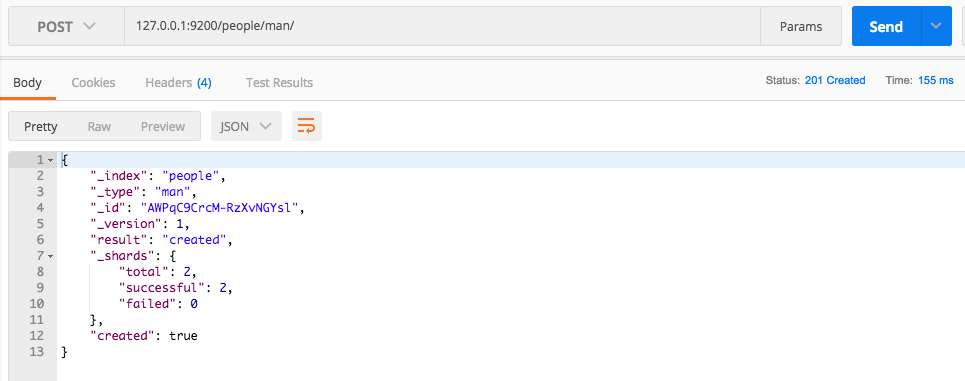
2.3.2 自动产生文档ID插入
利用postman工具, 输入
127.0.0.1:9200/people/man/     POST请求
{
	"name" : "harvey",
	"country" : "China",
	"age" : 24,
	"date": "2018-06-10 22:08:08"
}
此时生成的id是随机字符串
2.4 修改数据
2.4.1 直接修改文档
利用postman工具, 输入
127.0.0.1:9200/people/man/1/_update     POST请求
{
	"doc" : {
    	"name" : "修改为HarveyTuan"
	}
}
_update 表示更新操作
2.4.2 通过脚本修改文档
输入
127.0.0.1:9200/people/man/1/_update     POST请求
{
	"script" : {
    	"lang" : "painless",
    	"inline" : "ctx._source.age += 10"
	}
}
- script -- 使用脚本执行
- lang -- 指定脚本类型(painless为ES默认的脚本)
- inline -- 指定执行脚本内容
- ctx -- 代表当前ES的上下文
- _source -- 代表ES当前的文档
- age -- 执行的文档的参数
也可以输入
127.0.0.1:9200/people/man/1/_update     POST请求
{
	"script" : {
		"lang" : "painless",
		"inline" : "ctx._source.age = params.age",
		"params" : {
			"age" : 100
		}
	}
}
直接通过params进行参数的赋值
2.5 删除
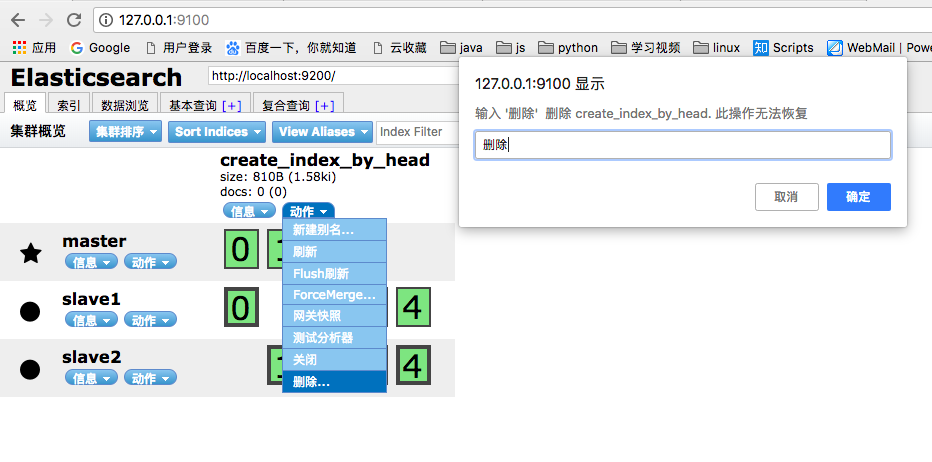
2.5.1 删除索引
第一种, 输入
127.0.0.1:9200/people DELETE请求
第二种:
2.5.2 删除文档
输入
127.0.0.1:9200/people/man/1/ DELETE请求
2.6 查询
2.6.1 简单查询
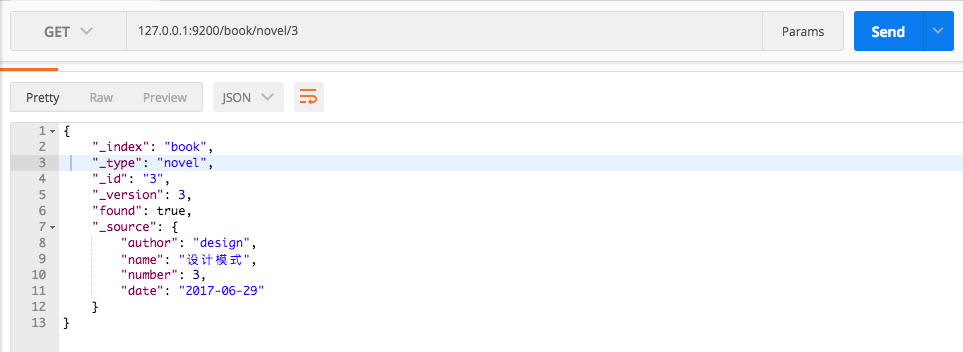
条件查询,一定是用“query”开头,检索的是整个索引,而不是具体的类型。
匹配所有
127.0.0.1:9200/book/_search     POST请求
{
	"query" : {
		"match_all" : {}
	},
	"from" : 1,
	"size" : 1
}
根据author字段匹配查询,并排序
{
	"query" : {
		"match" : {
			"author" : "harvey"
		},
		"sort": [
			{"number" : {"order" : "desc"}}
		]
	}
}
2.6.3 聚合查询
根据author字段聚合查询,查询结果为分组统计
{
	"aggs" : {
		"group_by_author" : {
			"terms" : {
				"field" : "author"
			}
		}
	}
}
聚合查询结果如下:
{
    "took": 347,
    "timed_out": false,
    "_shards": {
        "total": 5,
        "successful": 5,
        "failed": 0
    },
    "hits": {
        "total": 4,
        "max_score": 1,
        "hits": [
            {
                "_index": "book",
                "_type": "novel",
                "_id": "2",
                "_score": 1,
                "_source": {
                    "author": "jiwei",
                    "name": "禅道",
                    "number": 34,
                    "date": "2016-09-10"
                }
            },
            {
                "_index": "book",
                "_type": "novel",
                "_id": "4",
                "_score": 1,
                "_source": {
                    "author": "康神",
                    "name": "考研英语",
                    "number": 15,
                    "date": "2018-06-29"
                }
            },
            {
                "_index": "book",
                "_type": "novel",
                "_id": "1",
                "_score": 1,
                "_source": {
                    "author": "harvey",
                    "name": "elasticsearch 学习",
                    "number": 10,
                    "date": "2018-10-09"
                }
            },
            {
                "_index": "book",
                "_type": "novel",
                "_id": "3",
                "_score": 1,
                "_source": {
                    "author": "design",
                    "name": "设计模式",
                    "number": 3,
                    "date": "2017-06-29"
                }
            }
        ]
    },
    "aggregations": {
        "group_by_author": {
            "doc_count_error_upper_bound": 0,
            "sum_other_doc_count": 0,
            "buckets": [
                {
                    "key": "design",
                    "doc_count": 1
                },
                {
                    "key": "harvey",
                    "doc_count": 1
                },
                {
                    "key": "jiwei",
                    "doc_count": 1
                },
                {
                    "key": "康神",
                    "doc_count": 1
                }
            ]
        }
    }
}
聚合查询比普通查询,多了一个聚合的参数aggregations
根据number字段聚合查询,查询结果为该字段的相关计算信息
{
	"aggs" : {
		"grades_by_author" : {
			"stats" : {
				"field" : "number"
			}
		}
	}
}
结果为
{
    "took": 55,
    "timed_out": false,
    "_shards": {
        "total": 5,
        "successful": 5,
        "failed": 0
    },
    "hits": {
        "total": 1,
        "max_score": 1,
        "hits": [
            {
                "_index": "book",
                "_type": "novel",
                "_id": "2",
                "_score": 1,
                "_source": {
                    "author": "jiwei",
                    "name": "禅道",
                    "number": 34,
                    "date": "2016-09-10"
                }
            }
        ]
    },
    "aggregations": {
        "grades_by_author": {
            "count": 4,
            "min": 3,
            "max": 34,
            "avg": 15.5,
            "sum": 62
        }
    }
}

