笔者一般在ViewController的viewWillAppear中处理导航条的UI变化。比如是否隐藏导航栏、改变状态栏颜色等。但是最近发现在viewWillAppear中改变navigationBar的titleTextAttributes属性却出现了问题:
Issue
从当前ViewController点击导航栏返回的时候并没有生效,而使用滑动手势返回却可以生效。下面两个GIF分别表示想要的效果和问题情况:
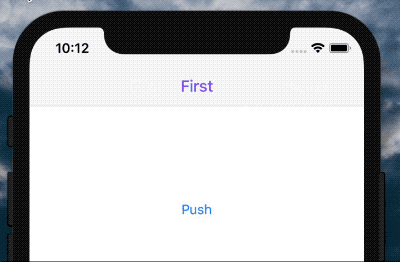 美好的理想.gif
 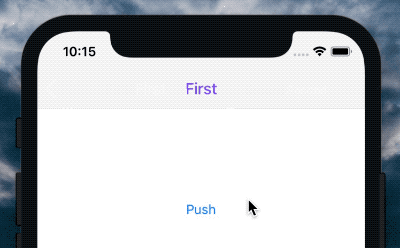 残酷的现实.gif
想直接看解决后代码(美好的理想.gif)的童鞋可以直接跳到文末↓↓↓。
Code
接下来展示示意代码,想看源码可以在github的issues分支中找到:
github.com/wiiale/Navg…
/// FirstViewController.swift
import UIKit

class FirstViewController: UIViewController {
    ...
    override func viewWillAppear(_ animated: Bool) {
        super.viewWillAppear(animated)

        navigationController?.setNavgationBarTitleTextAttributes(
            color: .nav_purple,
            font:  .nav_regular
        )
    }
    ...
}
/// SecondViewController.swift
import UIKit

class SecondViewController: UIViewController {
    ...
    override func viewWillAppear(_ animated: Bool) {
        super.viewWillAppear(animated)

        navigationController?.setNavgationBarTitleTextAttributes(
            color: .nav_black,
            font:  .nav_small
        )
    }
}
实际业务中可能按照需求会有更好更全的封装,但这里为了简单描述情况,对setNavgationBarTitleTextAttributes做了简单业务封装,只对title的颜色和字体做了处理。
import UIKit

extension UINavigationController {

    public func setNavgationBarTitleTextAttributes(color: UIColor?, font: UIFont?) {

        var textAttributes: [NSAttributedStringKey: AnyObject] = [:]

        if let c = color {
            textAttributes[.foregroundColor] = c
        }
        if let f = font {
            textAttributes[.font] = f
        }

        navigationBar.titleTextAttributes = textAttributes
    }
}
产生问题的原因
在iOS系统10以后,UIKit已经更新,统一后台管理UINavigationBar,UITabBar和UIToolbar。特别是,对这些视图的背景属性(例如背景或阴影图像或设置条形样式)的更改可能会启动条形码的布局传递以解析新的背景外观。
特别地,这意味着,试图改变的内部这些条的背景外观layoutSubviews,
-[UIView updateConstraints] ,
viewWillLayoutSubviews,
viewDidLayoutSubviews,
updateViewConstraints
或响应布局而调用的任何其他方法都可能导致布局循环。布局更改调用的viewWillAppear似乎触发了所提到的布局循环。
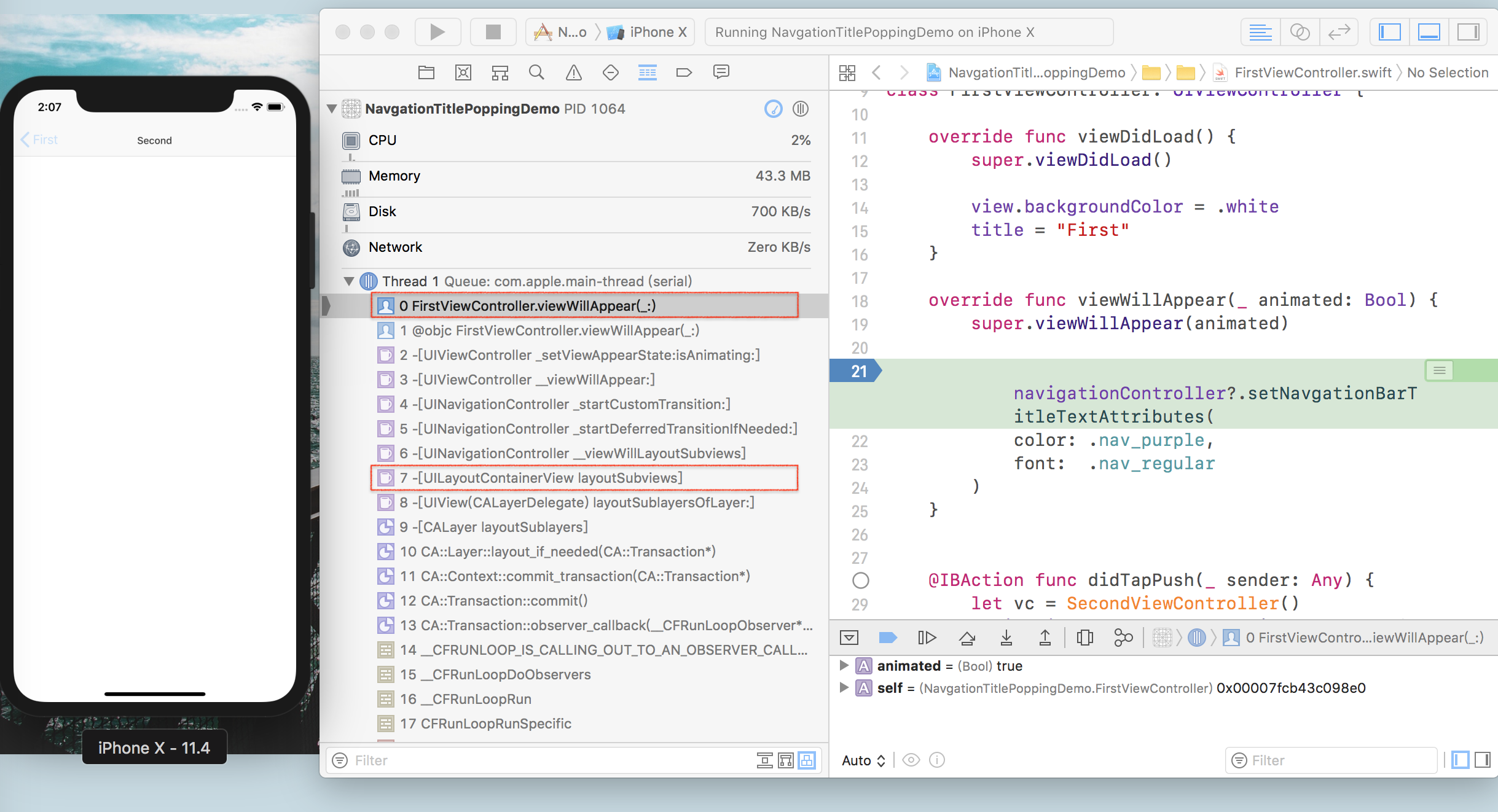 result of a layout change
解决办法
比较简单的处理方法是在SecondViewController中重写willMove(:)方法,在这里将titleAttribute赋值回去,但这样的方式不够彻底,它显然不能处理两种或两种以上的状态变化。 更为稳妥的的方法是重写自定义UINavigationController中的popViewController(:)方法。
class FunNavigationViewController: UINavigationController {
    ...
    override func popViewController(animated: Bool) -> UIViewController? {
        let popViewController = super.popViewController(animated: animated)
        // 返回前
        if let attributes = topViewControllerNavBarTitleAttributes {
            setNavBarTitleAttributes(attributes)
        }
        transitionCoordinator?.animate(alongsideTransition: nil) { [weak self] _ in
            // 返回后
            if let attributes = self?.topViewControllerNavBarTitleAttributes {
                self?.setNavBarTitleAttributes(attributes)
            }
        }
        return popViewController
    }
}
class MyViewController: UIViewController, NavBarTitleChangeable {

    var preferrdTextAttributes: [NSAttributedStringKey : AnyObject] {
        let item = FunNavTitleTextAttributesItem(color: .nav_purple, font:  .nav_regular)
        return getNavgationBarTitleTextAttributes(with: item)
    }

    ...
}
这里剥离了NavBarTitleChangeable,在每个ViewController中利用继承协议、类似preferredStatusBarStyle设置的方法代替了viewWillAppear中的设置方法。抽象了title设置的同时优化了代码:
// NavBarTitleChangeable.swift

import UIKit

public protocol NavBarTitleChangeable: class {
    var preferrdTextAttributes: [NSAttributedStringKey: AnyObject] { get }
}

extension NavBarTitleChangeable {

    public func getNavgationBarTitleTextAttributes(with item: FunNavTitleTextAttributesItem) -> [NSAttributedStringKey: AnyObject] {

        var textAttributes: [NSAttributedStringKey: AnyObject] = [:]

        if let color = item.color {
            textAttributes[.foregroundColor] = color
        }
        if let font = item.font {
            textAttributes[.font] = font
        }

        return textAttributes
    }
}

public struct FunNavTitleTextAttributesItem {
    let color: UIColor?
    let font: UIFont?
    init(color: UIColor? = nil, font: UIFont? = nil) {
        self.color = color
        self.font = font
    }
}
Demo:
github.com/wiiale/Navg…
解决后
实现理想
after.gif
注意点
App打开时并不会调用push和pop,造成首页的导航titleTextAttributes没有被设置。 处理方式:在自定义的UINavigationController中的viewDidLoad中设调用setNavBarTitleAttributes,或在AppDelegate的didFinishLaunchingWithOptions中设置全局的UINavigationBar.appearance().titleTextAttributes。
简单使用
Step1-Install
Clone Demo,将NavBarTitleChangeable.swift和FunNavigationViewController.swift文件拖入工程或直接复制代码:
github.com/wiiale/Navg…
Step2-Usage
在想要改变状态的VC中继承NavBarTitleChangeable实现preferrdTextAttributes
class FirstViewController: UIViewController, NavBarTitleChangeable {
    var preferrdTextAttributes: [NSAttributedStringKey : AnyObject] {
        let item = FunNavTitleTextAttributesItem(color: .purple, font:  .boldSystemFont(ofSize: 18))
        return getNavgationBarTitleTextAttributes(with: item)
    }
}