In java/com.example.android.pets/data/PetContract.java
/**
 * Inner class that defines constant values for the pets database table.
 * Each entry in the table represents a single pet.
 */
public static final class PetEntry implements BaseColumns {

    /** Name of database table for pets */
    public final static String TABLE_NAME = "pets";

    /**
     * Unique ID number for the pet (only for use in the database table).
     *
     * Type: INTEGER
     */
    public final static String _ID = BaseColumns._ID;

    /**
     * Name of the pet.
     *
     * Type: TEXT
     */
    public final static String COLUMN_PET_NAME ="name";

    /**
     * Possible values for the gender of the pet.
     */
    public static final int GENDER_UNKNOWN = 0;
    public static final int GENDER_MALE = 1;
    public static final int GENDER_FEMALE = 2;
}
注意 PetContract 文件放在应用包名 (com.example.android.pets) 下单独的 data 包内,与 Activity 文件区分开。这是因为 Android 是通过包 (package) 来组织代码的,一类包存放一类特定功能的代码,例如 data 包下就存放数据相关的代码。
In java/com.example.android.pets/data/PetDbHelper.java
public class PetDbHelper extends SQLiteOpenHelper {
    private static final String DATABASE_NAME = "shelter.db";
    private static final int DATABASE_VERSION = 1;

    public PetDbHelper(Context context) {
        super(context, DATABASE_NAME, null, DATABASE_VERSION);
    }

    @Override
    public void onCreate(SQLiteDatabase db) {
        // Create a String that contains the SQL statement to create the pets table
        String SQL_CREATE_PETS_TABLE =  "CREATE TABLE " + PetEntry.TABLE_NAME + " ("
                + PetEntry._ID + " INTEGER PRIMARY KEY AUTOINCREMENT, "
                + PetEntry.COLUMN_PET_NAME + " TEXT NOT NULL, "
                + PetEntry.COLUMN_PET_BREED + " TEXT, "
                + PetEntry.COLUMN_PET_GENDER + " INTEGER NOT NULL, "
                + PetEntry.COLUMN_PET_WEIGHT + " INTEGER NOT NULL DEFAULT 0);";

        // Execute the SQL statement
        db.execSQL(SQL_CREATE_PETS_TABLE);
    }

    @Override
    public void onUpgrade(SQLiteDatabase db, int oldVersion, int newVersion) {
        // The database is still at version 1, so there's nothing to do be done here.
    }
}
SQLiteDatabase db = mDbHelper.getReadableDatabase();

// Define a projection that specifies which columns from the database
// you will actually use after this query.
String[] projection = {
    FeedEntry._ID,
    FeedEntry.COLUMN_NAME_TITLE,
    FeedEntry.COLUMN_NAME_SUBTITLE
    };

// Filter results WHERE "title" = 'My Title'
String selection = FeedEntry.COLUMN_NAME_TITLE + " = ?";
String[] selectionArgs = { "My Title" };

// How you want the results sorted in the resulting Cursor
String sortOrder = FeedEntry.COLUMN_NAME_SUBTITLE + " DESC";

Cursor cursor = db.query(
    FeedEntry.TABLE_NAME,      // The table to query
    projection,                // The columns to return
    selection,                 // The columns for the WHERE clause
    selectionArgs,             // The values for the WHERE clause
    null,                      // don't group the rows
    null,                      // don't filter by row groups
    sortOrder                  // The sort order
    );
将上述代码放入 try/finally 区块内,即使应用崩溃,也能保证执行 close method 关闭 Cursor。
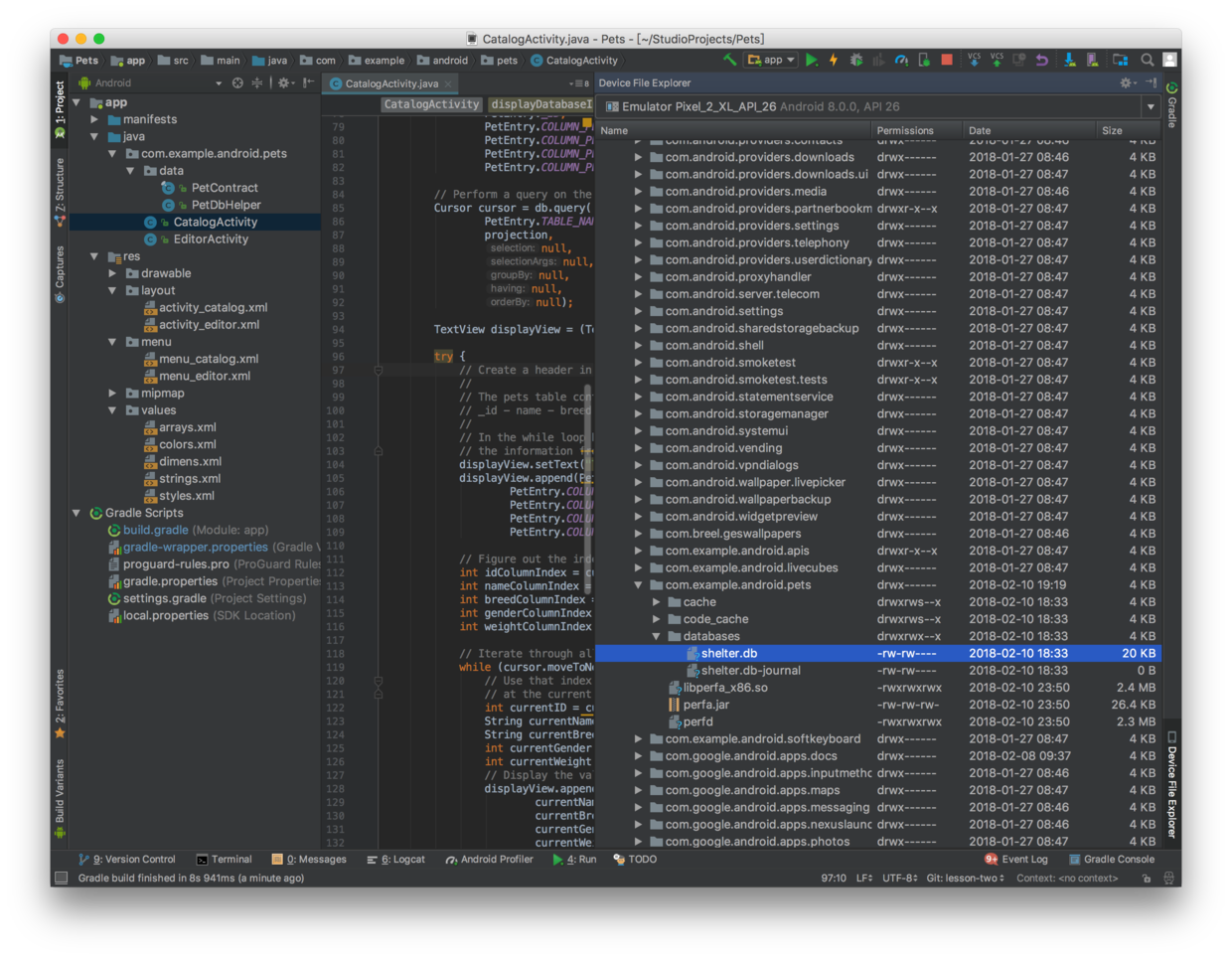
如何提取应用的数据库文件
在 Android Studio 界面右上角搜索 Device File Explorer 打开模拟器的文件浏览器,打开目录 data > data > com.example.android.pets > databases 即可查看应用内的数据库文件。右键选择 "Save As..." 将数据库文件提取到电脑中,即可通过终端访问。
@Override
protected void onCreate(Bundle savedInstanceState) {
super.onCreate(savedInstanceState);
setContentView(R.layout.activity_editor);
...
mGenderSpinner = (Spinner) findViewById(R.id.spinner_gender);
setupSpinner();
}
/**
* Setup the dropdown spinner that allows the user to select the gender of the pet.
*/
private void setupSpinner() {
// Create adapter for spinner. The list options are from the String array it will use
// the spinner will use the default layout
ArrayAdapter genderSpinnerAdapter = ArrayAdapter.createFromResource(this,
R.array.array_gender_options, android.R.layout.simple_spinner_item);
// Specify dropdown layout style - simple list view with 1 item per line
genderSpinnerAdapter.setDropDownViewResource(android.R.layout.simple_dropdown_item_1line);
// Apply the adapter to the spinner
mGenderSpinner.setAdapter(genderSpinnerAdapter);
// Set the integer mSelected to the constant values
mGenderSpinner.setOnItemSelectedListener(new AdapterView.OnItemSelectedListener() {
@Override
public void onItemSelected(AdapterView<?> parent, View view, int position, long id) {
String selection = (String) parent.getItemAtPosition(position);
if (!TextUtils.isEmpty(selection)) {
if (selection.equals(getString(R.string.gender_male))) {
mGender = PetEntry.GENDER_MALE;
} elseif (selection.equals(getString(R.string.gender_female))) {
mGender = PetEntry.GENDER_FEMALE;
} else {
mGender = PetEntry.GENDER_UNKNOWN;
}
}
}
// Because AdapterView is an abstract class, onNothingSelected must be defined
@Override
public void onNothingSelected(AdapterView<?> parent) {
mGender = PetEntry.GENDER_UNKNOWN;
}
});
}
Spinner 适配器设置为一个 ArrayAdapter,通过其静态方法 createFromResource 创建,输入参数分别为应用环境 (Context)、Array 资源 ID、布局资源 ID。其中,布局资源 ID 使用 Android 提供的默认布局 simple_spinner_item;Array 资源 ID 则是在应用内定义的资源。
In res/values/arrays.xml
<resources>
    <!-- These are the options displayed in the gender drop-down Spinner -->
    <string-array name="array_gender_options">
        <item>@string/gender_unknown</item>
        <item>@string/gender_male</item>
        <item>@string/gender_female</item>
    </string-array>
</resources>