无所事事的样子开始了摸鱼的一天
Vue Router
    // 用来注册插件,use接收一个参数,如果参数是一个函数的话,会调用这个函数注册,如果是一个对象的话,会调用对象里的install方法来注册
    Vue.user(VueRouter)
动态路由
其实就是路由懒加载~
    const routes = [
    {
        path:'/',
        name:'index',
        component:index
    },{
        path:'/detail/:id',
        name:'detail',
        // 开启props,会把url中的参数传递给组件
        // 组件中通过props来接收url参数
        props:true,
        // 路由懒加载~不调用不加载
        component:()=> import('../views/detail.vue')
    }]
    detail.vue
    // 获取路由规则传递的数据
    $route.params.id
    // 通过props接收
    export default{
        name:'detail',
        props:['id']
    }
    <div>{{id}}</div>
嵌套路由
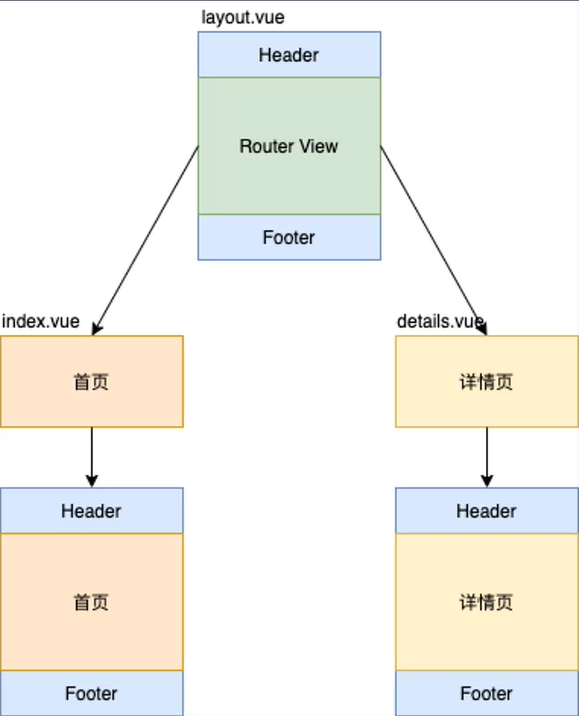
    {
        path:'/',
        component:Layout,
        children:[
        {
            name:'index',
            path:'',
            component:index
        },{
            name:'detail',
            path:'detail/:id',
            props:true,
            component:()=>import('@/views/Detail.vue')
        }]
    }
    // children 内的路由内容 会由占位符 router-view标签占位
编程式导航
    // 不会记录历史
    this.$router.replace('/')

    //会记录历史
    this.$router.push({name:'/helo',params:{id:5}})

    //向上返回X层
    this.$router.go(x)
hash和history模式
url的改变不会向服务器端发送请求 原理
- hash 基于锚点以及onhashchange事件的
- history模式是基于h5的history API的 // IE10以后支持
- history.pushState()
- 不会向服务器端发送请求,并留下访问历史记录
- history.replaceState()
Vue Router实现原理
- hash模式
- URL中#后面的内容作为路径地址
- 监听hashchange事件
- 根据当前路由地址找到对应组件重新渲染
- history模式
- 通过history.pushState()方法改变地址栏
-
仅改变地址栏,并记录访问历史,不会向服务器端请求
- 监听popstate事件
-
只有点击浏览器的前进后退按钮、api的back、go之类的函数才会触发
- 根据当前的路由地址找到对应组件重新渲染
    // use这个方法可以传入函数或者一个对象,函数则会直接调用,如果是对象,则会调用对象内的install方法
    Vue.use(VueRouter)
    // 创建路由对象
    const router = new VueRouter({
        routes:[
        {
            name:'home',
            path:'/',
            component:homeComponent
        }]
    })
    // 创建 Vue实例
    new Vue({
        router,
        render:h=>h(App)
    }).$mount('#app')
重写VueRouter
    let _Vue = null
    export default class VueRouter{
        static install(Vue){
            // 判断插件是否安装
            if(VueROuter.install.installed){
                return
            }
            VueRouter.install.installed=true
            // 把Vue构造函数记录到全局变量
            _Vue=Vue
            // 把创建的Vue实例时候传入的router对象注入到全部的Vue实例上
            // 混入这个选项
            _Vue.mixin({
                beforeCreate(){
                    if(this.$options.router){
                        _Vue.prototype.$router = this.$options.router
                        this.$options.router.init()
                    }
                }
            })
        }
        constrctor(options){
            this.options = options
            this.routeMap={}
            // 响应式数据对象
            this.data=_Vue.observable({
                current:'/'
            })
        }
        init(){
            this.initRouteMap()
            this.initComponents(_Vue)
            this.initEvent()
        }
        initRouteMap(){
            // 遍历所以了路由规则,把路由规则解析成键值对的形式 存储到routeMap中
            this.options.routes.forEach(route=>{
                this.routeMap[route.path]=route.component
            })
        }
        initComponents(Vue){
            Vue.component('router-link',{
                props:{
                    to:String
                },
                // 使用完整版的Vue
                // template:'<a :href="to"><slot></slot></a>',
                // 使用运行时版的Vue
                render(h){
                // h函数 第一个参数 选择器
                // 第二个 为dom对象设置属性
                // 第三个 生成的标签内的内容 数组形式
                    return h('a',{
                        attrs:{
                            href:this.to
                        },
                        on:{
                            click:this.clickHandler
                        }
                    },[this.$slots.default])
                },
                methods:{
                    clickHandler(e){
                    // pushState 第一个data 事件参数
                    // 第二个 title 网页的标题
                    // 第三个 url 跳转的链接
                        history.pushState({},'',this.to)
                        this.$router.data.current = this.to
                        e.preventDefault()
                    }
                }
            })
            const self = this
            Vue.component('router-view',{
                render(h){
                    const component = self.routeMap[self.data.current]
                    return h(component)
                }
            },[])
        }
        initEvent(){
            window.addEventListener('popstate',()=>{
                this.data.current = window.location.pathname
            })
        }
    }
    vue.config.js
    // 使用完整版的Vue
    module.exports={
        runtimeCompiler:true
    }
—————————————————————————————————————————————————————— 我这废柴